Abel’s Documentation Portal provides searchable, browser-based documentation to Abel users everywhere.
The structure of the Portal matches Abel’s menus. This makes it easy for users to find the topics they need. The user guide (like the menus) is organized into role-based sections.
- Use the search box to find material by keyword or topic number.
- Information for new users is at the top of the navigation pane.
- The Functional topics in the navigation pane match the Abel menus.

- Use F1 as a shortcut to open the Portal with a context-specific search (if configured). F1 Portal search is available from Abel Version 7.

- The Portal appearance adjusts when you resize the browser window so you can view the documentation while working with Abel.

Training Plans
The Abel Portal includes Training Plans for typical roles to guide learners through the topics they need. The training plans are intended to help with on-boarding of new staff and refresher training for existing staff, so your team can keep up their knowledge of Abel.
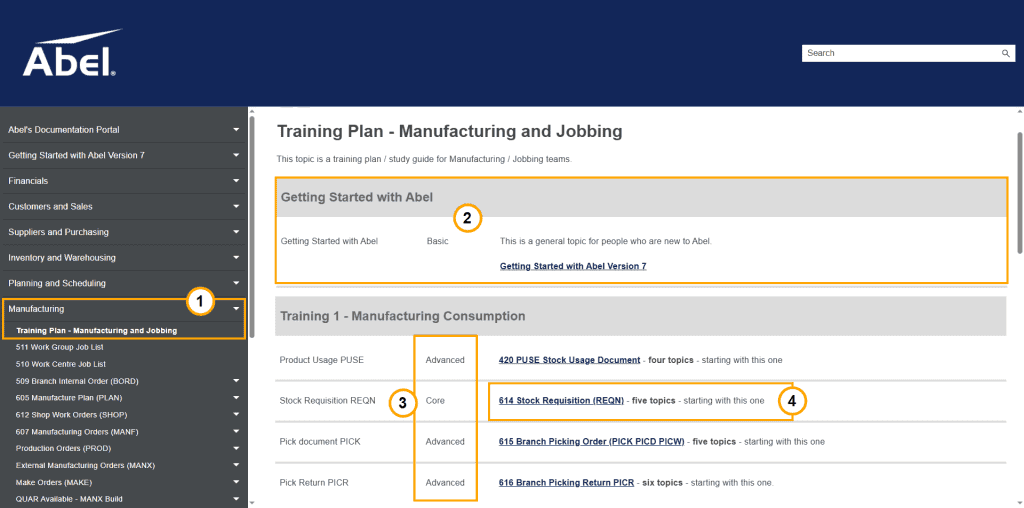
This example is from the training plan for Manufacturing and Jobbing:
- Each Function or Role has a Training Plan.
- All training plans start with Abel’s “Getting Started” guide.
- Topics are classified as “Core” or “Advanced”.
- Click a link to jump to the topic.