Abel’s Global Search is about to become your new best friend.
Available in Abel Version 7, Global Search lets you search across menus, documents, master data, and your own recent searches – all from one search box.
Get started with Global Search
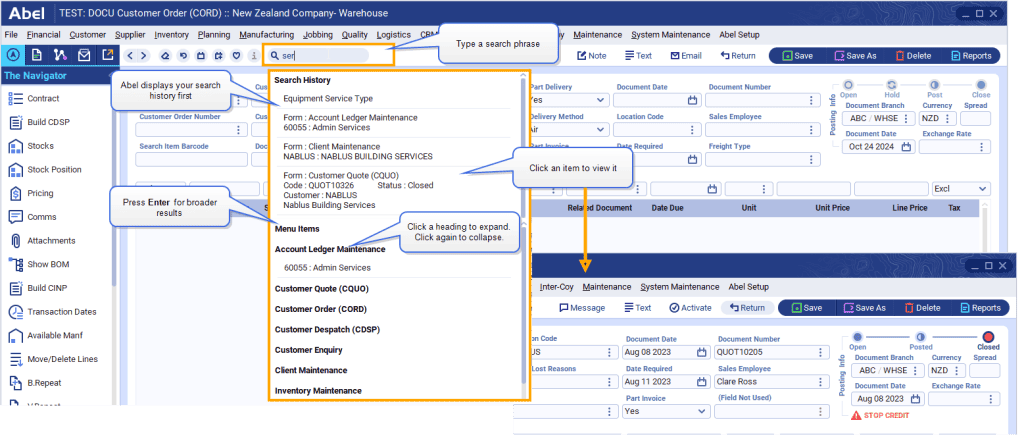
The search box is at the top of most Abel screens, just below the menu. Type a search phrase and press enter. Abel searches across Menu Items, Documents, and Master Data (think Clients, Inventory, Bills of Materials) and groups the results under headings.
Expand only what you need
Click to expand a heading and see the search results. Each group shows up to ten results, keeping things fast and easy to scan.
Navigate to any item
Click an item to view it. Abel opens the item you click so you get instant access to what you’re looking for.
See Search History first
Search again and you’ll notice that Abel remembers previous searches from your current Abel session. As you type, Abel shows items you’ve searched and selected – perfect for jumping back to recently searched screens or records to work with them again. Or press enter to search for something new.
Tips: If you want a particular client code or inventory code, you can search for those. If you know your form names such as InvtUpdate or your document types like CORD or SINV you can search for those too – ideal when you know what you need and want to find it quickly.
Make it a habit, and Global Search will be a tool you use every day.