Manage Supplier Progress Payments with Abel

Progress Payments are payments that you make in advance, before taking delivery of goods or receiving services. The goods often have a long lead time, so their progress payments require management through their lifecycle.

Abel’s Supplier Progress Payments are part of the Supplier Purchasing workflow. They are held in the Supplier Prepayments Sub-Ledger (not in the Creditors Ledger).

This diagram shows the Supplier Workflow with progress payments:

Image shows: Supplier Workflow with progress payments_AbelSoftware
Supplier Workflow with Progress Payments

Abel’s Supplier Progress Payments workflow works in parallel with the normal Supplier Purchasing workflow:

  • Create a Supplier Purchase Order, including progress payments.
  • Generate proforma invoices for progress payments that are due.
  • Abel records proforma invoices as open items on the supplier prepayments ledger.
  • Create a Supplier Payment and select the Proforma Invoice.
  • The Supplier Payment closes the proforma invoice open item on the supplier prepayments ledger.
  • The final supplier invoice automatically includes and deducts progress payments giving the balance owing.
  • You can view the status progress payments in the Supplier Progress Payments screen.

Example: Purchase Order with two progress payments. Color coding shows different stages of the lifecycle:
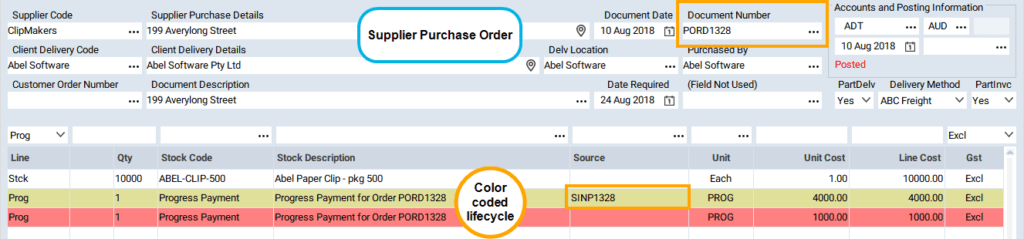
Image shows: Purchase Order with two progress payments. Color coding shows different stages of the lifecycle_AbelSoftware

Abel’s Supplier Progress Payment Enquiry shows a “lifecycle” view of progress payments.

Image shows: Abel’s Supplier Progress Payment Enquiry shows a “lifecycle” view of progress payments_AbelSoftware

Stay up to date with us

Explore our feature insights, practical tips, and company news.

Stay up to date with us

Explore our latest resources and expert insights and industry news.

rik

Ever finish a task only to realise you missed an important Abel message? Abel Version…

rik

Ever jumped between screens and thought, “Where was I just working?”Good news — Abel Version…

rik

Ever finish a task only to realise you missed an important Abel message? Abel Version…

rik

Ever jumped between screens and thought, “Where was I just working?”Good news — Abel Version…

rik

Following our recent South Island focus event in Christchurch, members of Abel’s Auckland team had…

rik

Ever finish a task only to realise you missed an important Abel message? Abel Version…

rik

Ever jumped between screens and thought, “Where was I just working?”Good news — Abel Version…

rik

Following our recent South Island focus event in Christchurch, members of Abel’s Auckland team had…

rik

The Navigator in Abel Version 7 is designed to bring relevant functions and actions into…

Find out how Abel® can benefit your business

Search