This is a “tips and time savers” blog – highlighting handy features you might not be aware of that can help in your day-to-day use of Abel.
As a business transaction goes through its lifecycle, Abel maintains links between related documents. Two examples:
- When you sell goods to a Customer, Abel links related documents together e.g.
Customer Quote, Customer Order, Customer Despatch, Customer Invoice and Customer Receipt.
- When you purchase goods from a Supplier, Abel links related documents together e.g.
Supplier Purchase Order, Supplier Delivery, Supplier Invoice and Supplier Payment.
Depending on your business process, there may be different documents present e.g. Export Containers or Pro-forma invoices for Customer Deposits and Supplier Progress Payments.
Abel makes it easy for you to navigate between related documents:
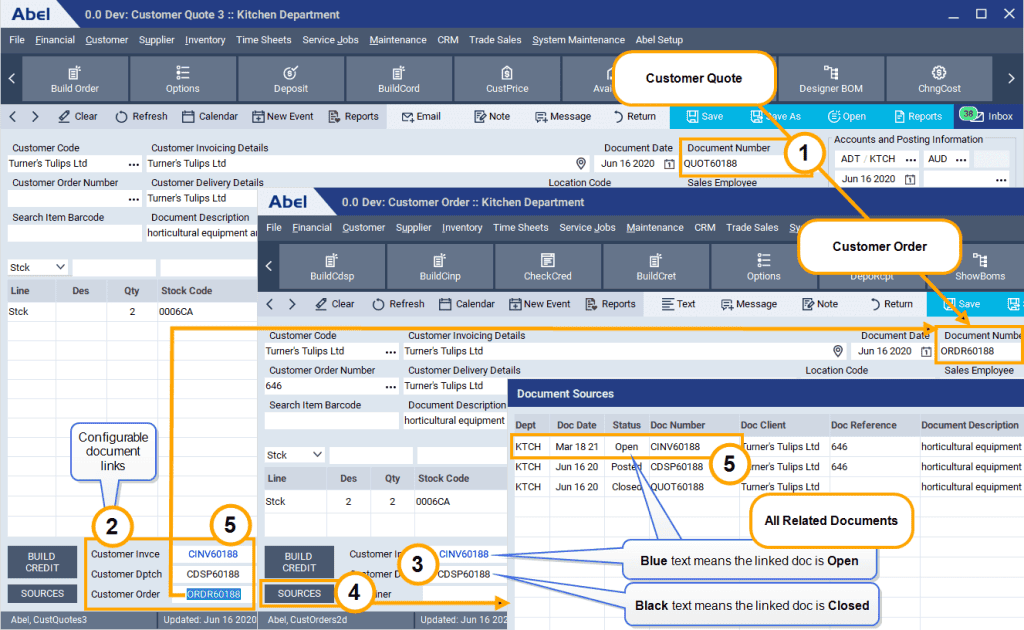
- This example shows a Customer Quote and its related Customer Order document.
- The fields at the bottom left of the document screen show up to three related documents.
- Blue text in a document link means the related document is Open.
Black text means the related document is Posted or Closed. - Click the Sources button to see more detail on related documents.
- Double-click to view a related document.