This is a “tips and time savers” blog – highlighting handy features you might not be aware of that can help in your day-to-day use of Abel.
Filtering Tables in Abel
Many screens in Abel have dedicated filter fields. But what about screens that don’t have filter fields or don’t have the filters you want? Many tables in Abel can have column filters configured in the table headings, so you can filter a table’s rows for a selected column value. Column filters suit maintenance screens, enquiry screens, register screens and many others where filtering improves usability (but not document screens).
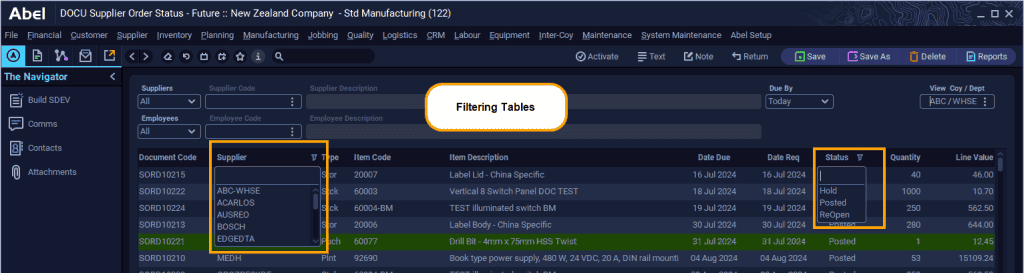
This example shows a screen with filters on Supplier and Status:
- The filters are configured by Abel installers.
- Filters appear with a drop-down icon beside the heading.
- Select a value from the drop-down to filter the table.
Sorting Tables in Abel
Most tables in Abel can be sorted. To sort a table:
- Click the column heading to sort Ascending.
- Click again to sort Descending.
Abel shows an underline under the column heading that you sorted by.