Abel Tips and Timesavers – Using Abel’s Navigator

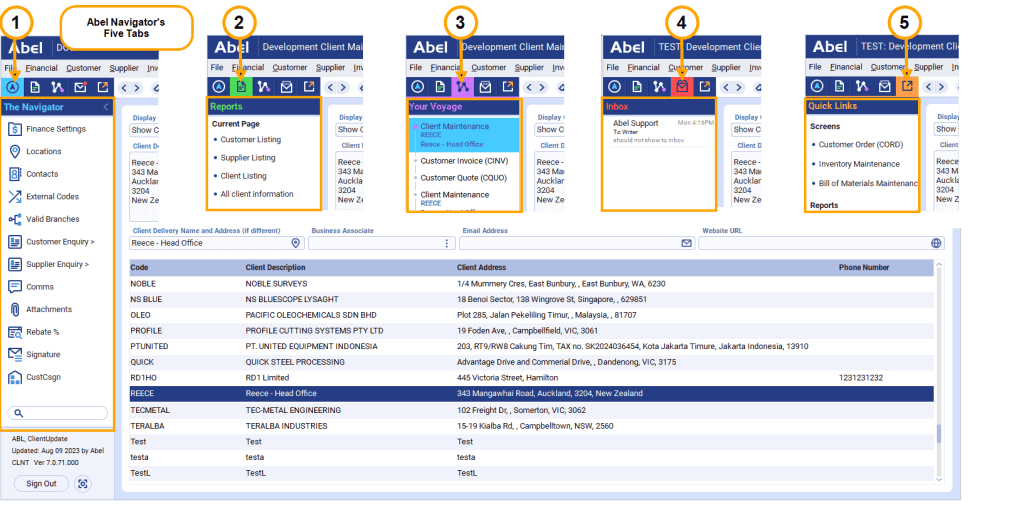
Abel® Version 7 has a Navigator Panel that provides fast access to common functions, holds your recent history and provides quick links to screens and reports that you specify. The navigator is available on most Abel screens and has five tabs:

  1. The Navigator – Contains the function and navigation buttons for the current screen.
  2. Reports – Lists reports configured for the current screen.
  3. Your Voyage – Holds a recent history of screens you’ve visited, and the last record you viewed on each one. Click to navigate back to them.
  4. Message Inbox – Lists your newest Abel messages.
  5. Quick Links – Contains links you’ve saved to your most-used screens and reports.
Stay up to date with us

Explore our feature insights, practical tips, and company news.

Stay up to date with us

Explore our latest resources and expert insights and industry news.

jane

To celebrate the start of Abel’s 30th year, we tried something different by bringing together…

rik

The Navigator in Abel Version 7 is designed to bring relevant functions and actions into view…

jane

To celebrate the start of Abel’s 30th year, we tried something different by bringing together…

rik

The Navigator in Abel Version 7 is designed to bring relevant functions and actions into view…

rik

Abel’s Global Search is about to become your new best friend. Available in Abel Version…

jane

To celebrate the start of Abel’s 30th year, we tried something different by bringing together…

rik

The Navigator in Abel Version 7 is designed to bring relevant functions and actions into view…

rik

Abel’s Global Search is about to become your new best friend. Available in Abel Version…

jane

Abel is celebrating 30 years in business, and the continued growth of Abel®, our flagship…

Find out how Abel® can benefit your business

Search